
SharePoint Archiving Solution for Microsoft 365 Storage
ShareArchiver is a SharePoint archiving solution that automatically moves inactive SharePoint files to lower-cost archive storage while keeping them accessible from SharePoint and OneDrive. Organizations can reduce Microsoft 365 storage costs by up to 80% without changing the way users find and open their files.
Designed for IT teams managing fast-growing SharePoint Online data, ShareArchiver combines file-level archiving, policy-based automation, flexible storage and seamless user access. It helps keep the SharePoint environment lean, searchable and compliant while giving administrators greater control over data location and cost.
- SharePoint Online & On-Premises
- Policy-Based Retention & Compliance
- Preserve Metadata & Permissions
- Reduce SharePoint Storage Costs
Analyze
Identify inactive SharePoint content based on age, usage and business rules
Archive
Move inactive SharePoint files to lower-cost archive storage tiers
Govern
Apply retention, compliance and records management policies
Retrieve
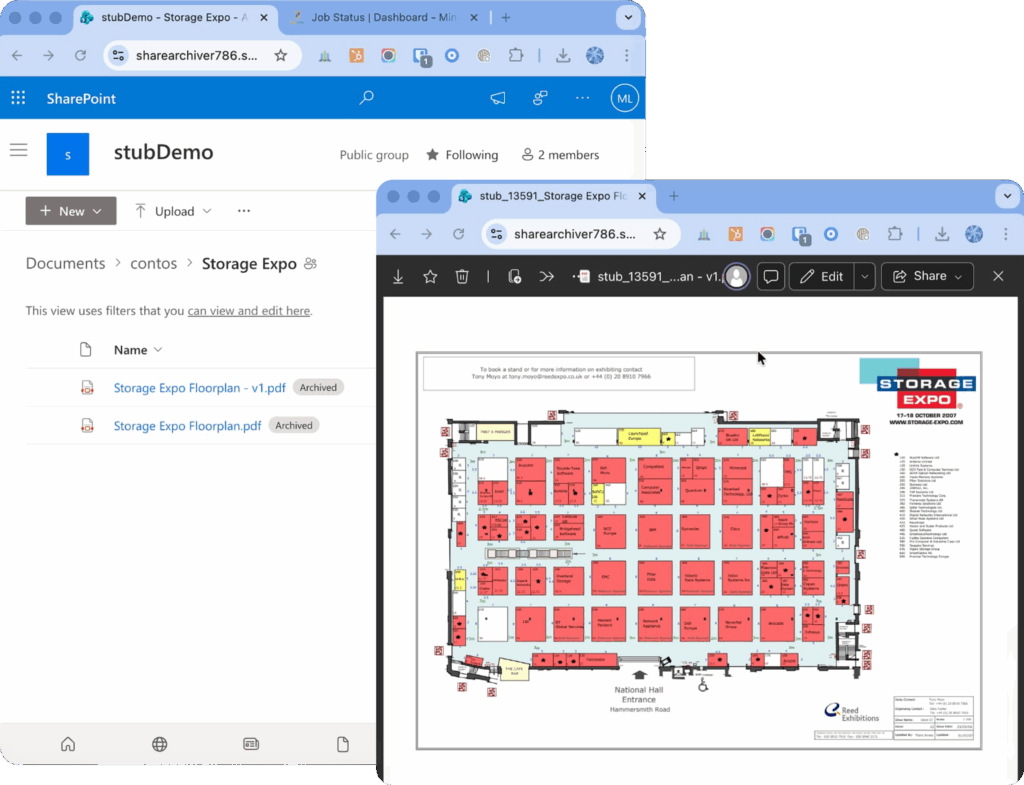
Access archived SharePoint files seamlessly from their original locations
Reduce SharePoint Online Storage Costs Without Disrupting Users
Most organizations don’t realize how quickly SharePoint storage costs grow.
-
Sharepoint
Overage Storage
- 5 TB
- 10 TB
- 15 TB
- 25 TB
- Monthly Cost
- $1,000
- $2,000
- $3,000
- $5,000
- Annual Cost
- $12,000
- $24,000
- $36,000
- $60,000
And that cost is just for storage.

SharePoint Online includes a tenant storage allocation based on your Microsoft 365 licensing. As collaboration expands, document uploads, version history, Microsoft Teams activity and everyday file changes all add to total storage usage. Once the included capacity is consumed, additional SharePoint storage can become a significant recurring cost.
Many organizations continue paying premium rates for old files and outdated content that are rarely accessed. ShareArchiver identifies this inactive content and moves it to cheaper storage, reducing active SharePoint Online storage while leaving the user experience intact.
At approximately $200 per TB per month for additional storage, 5 TB can cost around $12,000 per year and 25 TB can reach $60,000 per year. Archiving inactive SharePoint files can deliver substantial cost savings before storage growth affects budgets, backups, search indexing and site performance.
What Is a SharePoint Archiving Solution?
A SharePoint archiving solution separates active and inactive content. Active files remain in primary SharePoint storage, while archive candidates are moved to a lower-cost cold storage tier or external storage platform. The goal is to reduce storage costs without deleting business data or making archived content difficult to retrieve.
Unlike a simple migration or deletion project, online archiving applies repeatable policies to SharePoint content. Administrators can manage data according to file age, last activity, file size, file type, folder location and business requirements.
File-Level Archiving for Individual Files
File-level archiving allows one or more files to be archived without taking an entire site offline. ShareArchiver can identify inactive files inside active SharePoint sites and move only the qualifying content. This precision is useful when a site still supports current work but contains years of inactive data.
Site-Level Archiving and Entire SharePoint Sites
Site-level archiving is suited to inactive SharePoint sites that no longer support day-to-day collaboration. An entire site can be treated differently from active sites, but many organizations need both site-level and file-level options. ShareArchiver focuses on policy-driven control at the file level while preserving access through the existing SharePoint structure.
ShareArchiver vs. Microsoft 365 Archive
Microsoft 365 Archive provides native site-level and file-level archiving within SharePoint. Archived content moves to a lower-cost Microsoft storage tier and remains subject to Microsoft security, retention and compliance controls. It is managed through the SharePoint Admin Center by SharePoint or Global Administrators, while users with edit permissions can archive eligible individual files when file-level archiving is enabled.
Native archived files remain visible but must be reactivated before their contents can be opened. Reactivation can take up to 24 hours, and some experiences—including certain versions of Word, PowerPoint Online, OneDrive and Microsoft Teams—have limitations with archived files.
- Feature
- Data Retrieval Time
- Cost Structure
- Searchability
- Granularity
- End-User Impact
- How it works
- Microsoft 365 Archive (Native)
- Up to 24-hour "rehydration" delay for files older than 7 days.
- Pay-as-you-go + Restoration fees ($/GB) to access your own data.
- Archived sites are often hidden from standard search and Copilot.
- Primarily site-based; archiving individual files can be complex.
- Users encounter "Access Denied" or 423 errors on archived sites.
- Driven by users, data owners, user decide what to archive.
- ShareArchiver Solution
- Instant, on-demand access. No waiting for files to "wake up."
- Predictable subscription. No hidden penalties for restoring files.
- Full metadata preservation. Files remain searchable and discoverable.
- File-level precision. Archive exactly what you need, leave the rest.
- Seamless stubbing. Users open archived files as if they never moved.
- Administrator lead policy driven archiving, adds to user productivity
Where ShareArchiver
Stands Apart
- Capability
- Storage Choice
- Analytics
- User Workflows
- Access Outside SharePoint
- Compliance Support
- Seamless Access

- Wasabi, Amazon S3, Azure, on-prem
- Advanced data analysis and reporting
- Seamless SharePoint access
- ShareArchiver File Explorer
- Built for governance and discovery
- Seamless Access OneDrive/SharePoint
- Typically Azure only
- Basic Reporting
- Varies by Implementation
- Often Unavailable
- Limited Focus
- Archived Data, not Accessible on Demand
The right approach depends on how quickly files must be retrieved, who controls the storage, which applications users depend on and whether the organization needs automated policy-based archiving.
Choose Where Archived SharePoint Data Is Stored
ShareArchiver is storage agnostic. Archived content can be moved to Wasabi, Amazon S3, Azure Blob Storage, on-premises storage or a hybrid storage environment. This freedom allows organizations to choose archive storage based on price, data residency, compliance requirements and existing infrastructure.
Using an external storage platform also avoids locking the archive strategy into a single cloud. Organizations can align each repository with operational and records management needs while maintaining centralized visibility into the archived data.

Why Organizations Choose ShareArchiver
Advanced Analytics for Smarter Archiving
ShareArchiver provides analytics and data visuals that reveal inactive files, rapidly growing libraries, excessive version history and high-value archive candidates. These insights help IT teams make informed decisions instead of guessing which SharePoint files should be moved.
Access Through SharePoint, OneDrive and Microsoft Teams
Archived files remain visible in their original location and can be accessed through SharePoint and OneDrive without installing client software. This seamless access reduces training, support requests and disruption to existing workflows. Content surfaced through connected Microsoft Teams experiences remains part of the familiar Microsoft 365 environment.
Access Archived Content Outside SharePoint
Authorized administrators and users can also browse archived files through ShareArchiver File Explorer. This additional access path improves operational resilience and ensures the archive does not depend on a single front-end application.

Preserve Metadata, Permissions and Version History
Traditional data movement can create silos or break searchability by stripping away important SharePoint metadata. ShareArchiver preserves information such as Created By, Modified Date, custom columns and version history. The lightweight stub remains in the original location with the metadata needed for users, SharePoint Search and Microsoft 365 Copilot to discover the file.
Maintaining metadata and permissions is essential when archiving SharePoint content. It supports governance, reduces data exposure and helps authorized users find the correct information without browsing an unfamiliar archive vault.
Retention, eDiscovery and Compliance
ShareArchiver supports data retention, discovery and governance requirements by maintaining visibility and control over archived content. Retention policies, retention labels, audit information and defined ownership should form part of every SharePoint archiving strategy.
Archived data remains searchable through ShareArchiver’s eDiscovery capabilities, helping teams respond to audits, legal discovery and compliance requests. This provides a governed alternative to keeping every record in active storage or relying on accidental deletion to reduce clutter.
SharePoint Archiving Is Not the Same as Backup
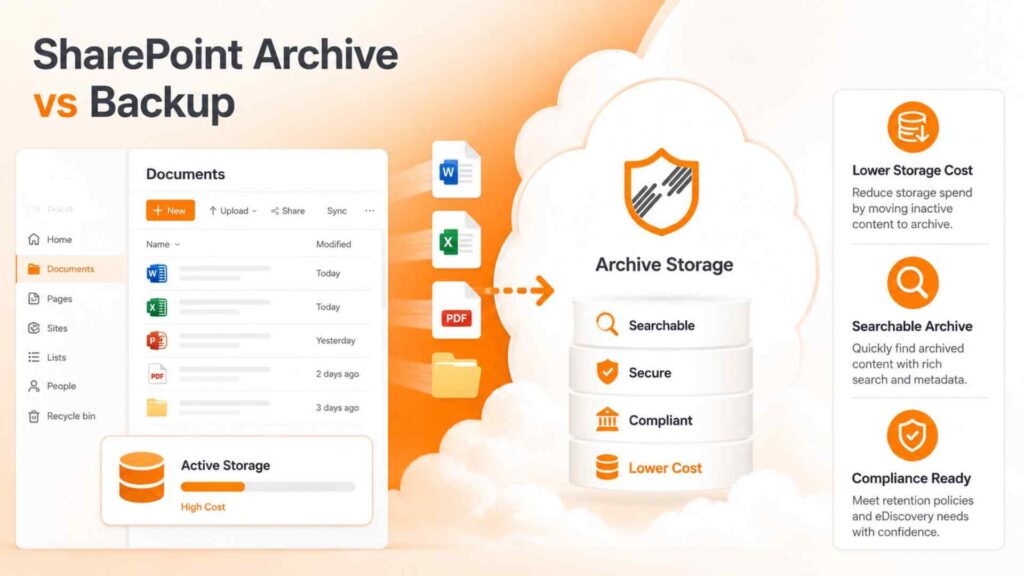
Archiving manages the lifecycle and cost of inactive content. Backup protects active and archived data against corruption, data loss and accidental deletion. Retention determines how long information must be kept, while deletion permanently removes it when permitted.
These controls solve different problems. A complete data management strategy can use archiving to optimize storage, backup for recovery, and retention policies for legal and business obligations.
Migrate File Server Data to SharePoint Without Storage Bloat
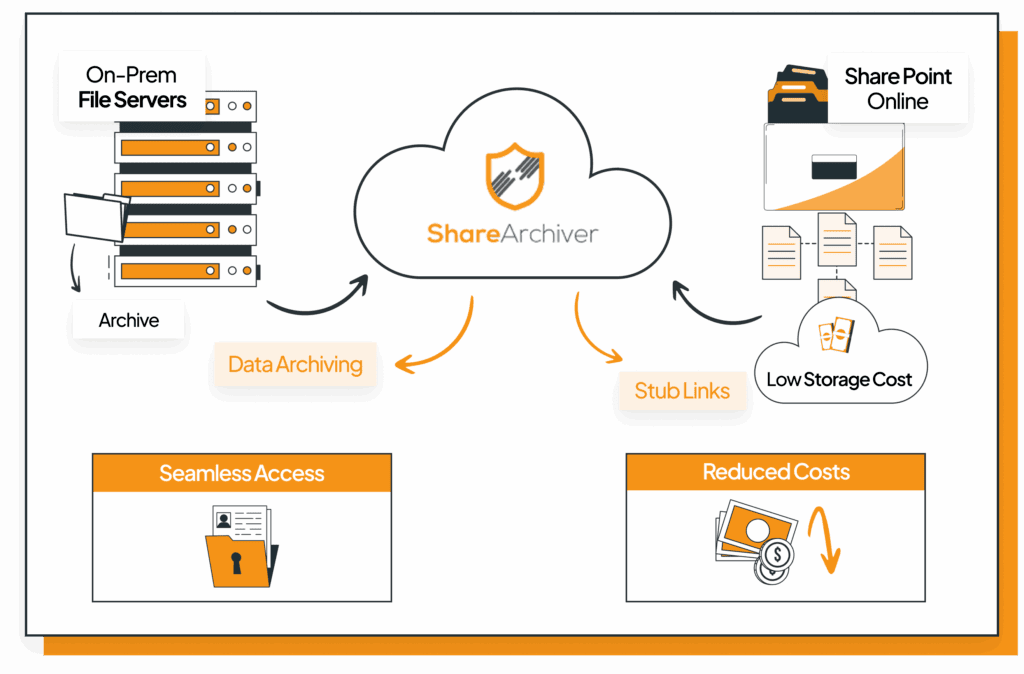
Moving file server data to SharePoint can be slow and expensive when years of inactive content consume the tenant’s storage allocation. ShareArchiver can ingest file server data into a secure archive and publish lightweight stubs into SharePoint on demand.
The stubs recreate the existing folder structure while the actual data remains in lower-cost storage. Users gain familiar SharePoint access without moving every terabyte into premium SharePoint Online storage.
Who Is ShareArchiver For?
ShareArchiver is suited to organizations with growing Microsoft 365 storage usage, large volumes of old files, hybrid infrastructure, strict compliance requirements or a need for rapid access to archived content. It gives IT, governance and records teams a common framework for controlling SharePoint data across active and inactive sites.
The result is lower SharePoint storage costs, better data visibility, faster backups and syncs, stronger governance and minimal disruption to users. Organizations can reduce site collection size by up to 90% while keeping files visible and accessible.
FAQs
How does SharePoint archiving work?
ShareArchiver identifies inactive SharePoint data using policies, moves the original content to lower-cost storage and leaves a lightweight stub in SharePoint for seamless access.
Can SharePoint archiving be automated?
Yes. Administrators can define archiving policies based on file age, activity, size, type, folder location and other business rules.
Can I choose where archived SharePoint files are stored?
Yes. Supported options include Wasabi, Amazon S3, Azure Blob Storage, on-premises storage and hybrid environments.
Will users notice when a file is archived?
Users continue to see files in their original SharePoint and OneDrive locations. Clicking a stub retrieves the original content without requiring separate client software.
Does ShareArchiver preserve metadata and searchability?
Yes. ShareArchiver preserves SharePoint metadata, custom columns and version history so archived files remain discoverable through familiar search and governance workflows.
How does ShareArchiver reduce storage costs?
It moves inactive files out of premium primary storage and into a cheaper archive tier, reducing the amount of additional SharePoint storage the organization needs to purchase.
Is ShareArchiver suitable for hybrid SharePoint environments?
Yes. ShareArchiver supports cloud, on-premises and hybrid archive storage, allowing organizations to align data location with cost, compliance and infrastructure requirements.
Can ShareArchiver migrate file server data to SharePoint?
Yes. It can preserve the familiar folder structure through lightweight SharePoint stubs while storing the underlying file data in lower-cost archive storage.