
Keep inactive files organised, searchable and governed while taking pressure off your primary storage.
Completed projects, historical contracts and years of business documents still matter after daily use ends. Keeping everything on primary storage makes information management more expensive and finding important documents more time consuming.
Digital archiving gives retained information a managed home. For IT teams, records managers and growing businesses, the benefits include more available storage, searchable electronic records and consistent retention rules.
Use this guide to compare archiving solutions, understand the benefits and evaluate software against your own documents, access needs and budget.
What is a digital archiving system?
A digital archiving system combines software and storage to preserve digital content for future access. Policies, metadata, indexing and access control help keep business records organised, stored securely and accessible throughout their retention period. For a business file archive, explore ShareArchiver’s archive storage solution and compare its storage and retrieval approach with your requirements.
Digital archiving, also called electronic archiving, is the process of preserving and managing that information. Archiving software helps automate decisions that would otherwise depend on employees moving documents between file folders.
The archive may contain born digital materials, such as contracts created in business applications, or documents scanned from paper and other analog media. Both need metadata that explains their business context. Typical digital files include financial records, engineering drawings, images and completed project documents.
The practical test is whether retained documents remain accessible to authorised people after they leave active storage.
How does digital archiving work?
Digital archiving follows a repeatable lifecycle, from data ingestion and classification to long term storage, access and review.
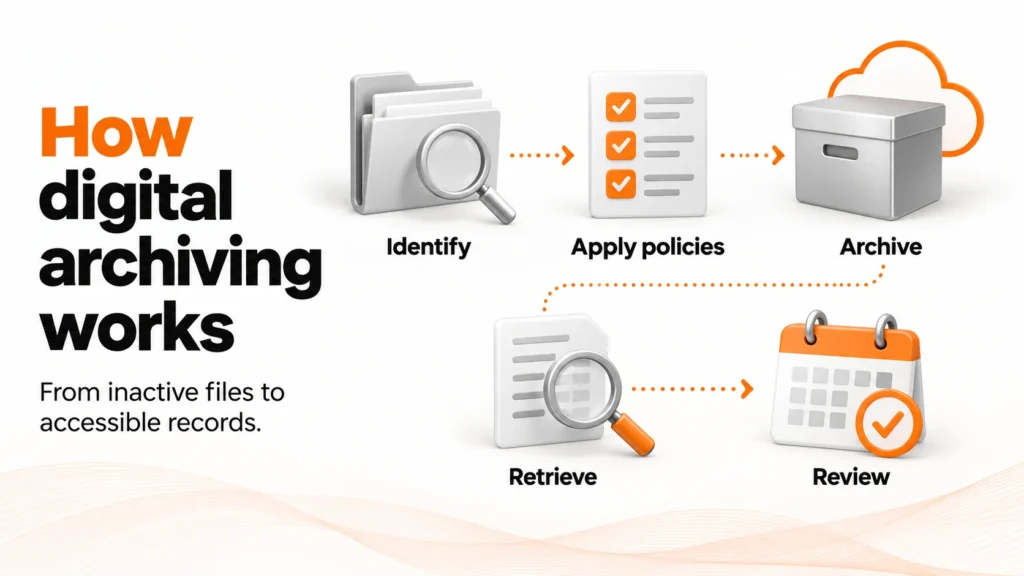
1. Identify the information worth retaining
During data ingestion, the platform collects eligible electronic files and their metadata from supported sources. Classification identifies their record category, owner and retention rules. Examine data volumes, locations and usage before deciding which documents belong in the archive.
Age alone is an incomplete signal: an old drawing may support a live project, while a newly copied folder may contain inactive records.
2. Apply archiving and retention policies
Define when digital archiving should begin, where archived data will be stored and which access rights apply. Keep the archiving trigger separate from the retention period: moving a document into an archive does not determine when it can be deleted.
Exclude active projects, application dependencies and records under legal hold. These exceptions protect business activity and prevent routine retention rules from overriding preservation obligations.
3. Archive content and preserve its context
The platform transfers eligible documents into an archive repository. Metadata should preserve original locations, ownership, timestamps and access rights. Indexing connects documents to their business context, such as a customer, contract or project, and may support full-text search.
Verify transfer completeness and integrity before removing source content. A successful digital archiving job should record what was stored, what failed and which documents need attention.
4. Make archived documents easy to access
Users may find documents through search, an archive portal or a placeholder in their original location. Some file archiving platforms use stubs, which link to archived content without keeping the full document on primary storage.
Access speed depends on the destination. Some Amazon S3 archive storage classes require a restore request before documents become available. Test response times against actual business needs.
5. Review records throughout their lifecycle
Check that digital records remain readable, searchable and protected as technology changes. Review the retention period, access permissions and preservation requirements on an agreed schedule.
Before disposal, check applicable holds and approval requirements. Maintain an audit trail showing which business records were removed, when and under whose authority.
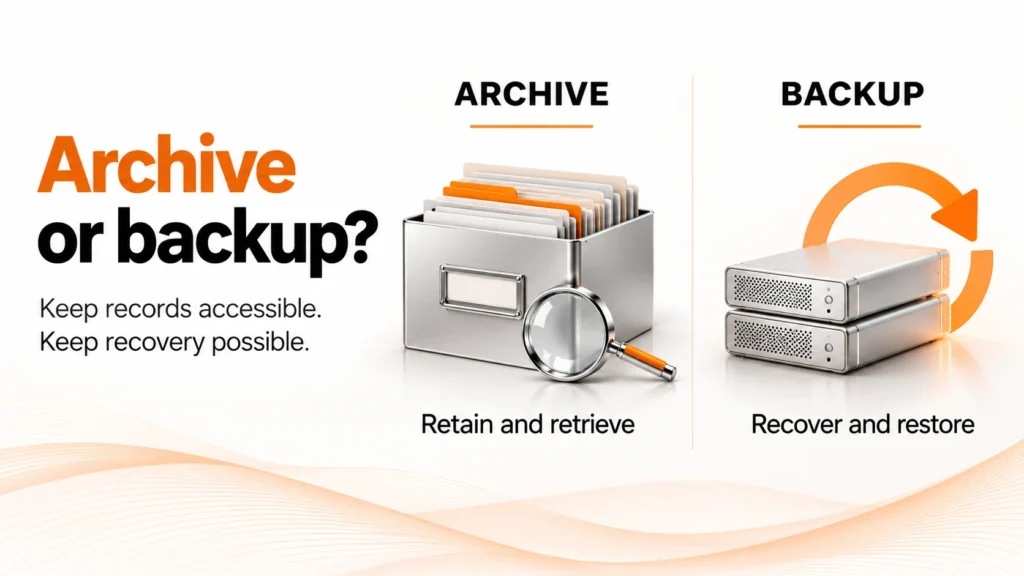
Digital archiving vs backup and document management
These tools can work together, but they solve different problems.
| System | Main purpose | Typical use |
|---|---|---|
| Digital archive | Retain information for future access and manage its lifecycle | Retrieve a completed project's files several years later |
| Backup | Recover data or systems following loss, corruption or an outage | Restore a deleted folder or recover a failed server |
| Document management system | Organise active documents and support everyday work | Collaborate on a contract, manage versions and route approvals |
Digital archiving needs its own protection and recovery plan. Moving documents out of production storage does not automatically protect them against data loss.
The 3-2-1 backup rule provides a useful starting point: three copies of data, on two different media types, with one copy offsite. CISA describes this approach as a backup strategy. Test restores and protect copies against unauthorised changes; archiving and backup still perform separate jobs.
A cloud storage bucket supplies capacity. Digital archiving software adds the policies, indexing, security and lifecycle processes needed to manage retained documents.
Types of digital archive systems, with examples
Start with the information you need to preserve. Digital archiving solutions differ in their supported sources, document archiving features and governance workflows. For shared files, drawings and other content outside structured databases, explore unstructured data management.
| Type of archive | Example content | Main evaluation priority |
|---|---|---|
| File and unstructured data archive | Project folders, drawings, images and shared digital files | Source compatibility, permissions and convenient document access |
| Document archiving and records archive | Contracts, invoices, tax documents and scanned records | Record classification, retention and searchable electronic records |
| Email and communications archive | Email, chat, video and collaboration records | Capture coverage, legal discovery workflows and export |
| Digital preservation repository | Historical collections, research material and cultural records | Long-term readability, provenance and preservation planning |
These categories overlap. Document archiving is relevant to businesses and public sector organisations, including government agencies. Communications archives serve different capture requirements. Ask vendors to demonstrate your content types; a file archive does not necessarily capture email, chat or video.
Cloud, on-premises or hybrid?
Electronic archiving can use cloud, on-premises or hybrid infrastructure. Cloud services offer remote capacity; an on-premises archive keeps infrastructure within your environment. A hybrid approach combines local and cloud components.
Choose according to data location, connectivity, access expectations and total cost. Explore ShareArchiver’s enterprise cloud archiving solution for a product-specific starting point. Compare deployment options in our enterprise cloud archiving solutions guide.
Benefits of digital archiving for businesses
Reduce pressure on primary storage
Digital archiving can reduce storage costs and free production capacity by moving inactive documents to a suitable archive tier. Removing archived content from the production backup scope may also reduce that workload. Plan archive protection separately.
The financial benefits depend on eligible data volumes, the destination and the costs of operating and accessing the archive.
Make retained information easier to find
Digital archiving makes historical documents easier to locate through metadata and searchable indexes. Staff can find important documents without remembering an old folder structure. This saves time when departments change, employees leave or electronic records are scattered across locations.
Manage business records and compliance requirements
Digital archiving policies reduce manual handling and the risk of inconsistent decisions. Define which business documents enter the archive, who can access them and how long they must be retained. Electronic archiving supports regulatory compliance when its controls match the organisation’s obligations.
In regulated environments, check retention rules, legal hold, access logging and protection against unauthorised changes. WORM storage can prevent protected objects from being overwritten or deleted during their configured retention period. Requirements vary: for example, SEC guidance for broker-dealers describes WORM and audit-trail alternatives. Software alone does not establish regulatory compliance.
How to choose digital archiving software
Choose archiving software that fits your documents, access needs and compliance requirements. Ask vendors to prove the following capabilities with a representative dataset. If SharePoint is a source, evaluate a dedicated SharePoint archiving solution against your permissions, access and storage requirements.
| Type of archive | Example content | Main evaluation priority |
|---|---|---|
| File and unstructured data archive | Project folders, drawings, images and shared digital files | Source compatibility, permissions and convenient document access |
| Document archiving and records archive | Contracts, invoices, tax documents and scanned records | Record classification, retention and searchable electronic records |
| Email and communications archive | Email, chat, video and collaboration records | Capture coverage, legal discovery workflows and export |
| Digital preservation repository | Historical collections, research material and cultural records | Long-term readability, provenance and preservation planning |
Compare the full cost of ownership
Include archiving software, capacity, migration, support and administration. For cloud destinations, examine request charges, access costs, data transfer and minimum storage durations.
Compare digital archiving suppliers using the same dataset, access assumptions and time horizon. Our digital archiving software comparison explains which platforms fit different workloads. A low price per terabyte can exclude substantial operating or exit costs.
Test retrieval with real users
Measure how long it takes to find and open documents. Include large files, older formats and different permission levels. Check how failed access requests are reported and resolved.
Preservation planning for digital content
Digital preservation requires ongoing maintenance of digital materials. A reliable storage medium cannot compensate for an unreadable file format or unavailable application. Where practical, use documented, widely supported formats and plan migrations before technology becomes obsolete.
Check integrity, metadata and permissions after moving documents or creating a new version. The US National Archives’ digital preservation resources explain how risk assessment and preservation planning support long term preservation of electronic records.
How to implement digital archiving
Start with a controlled electronic archiving pilot before expanding.
Establish a baseline. Record data volumes, document counts, usage patterns and storage costs. Decide how to measure the benefits.
Define ownership and policy. Agree eligibility, exclusions, retention periods and who approves digital archiving changes.
Choose a representative pilot. Include ordinary documents, permission exceptions and applications that depend on them.
Validate before expanding. Check stored documents, metadata, indexes, permissions and recovery. Investigate incomplete jobs.
Roll out and review. Expand by source or department. Track capacity, access times, failures and support requests.
Example: an archiving policy for completed projects
This illustrative digital archiving policy is not a recommended retention schedule or a specific product configuration.
| Policy element | Example decision |
|---|---|
| Source | An agreed completed-projects folder |
| Eligibility | Project confirmed closed and no file modification for 24 months |
| Exclusions | Active work, application dependencies and records subject to a hold |
| Destination | An approved archive tier with tested retrieval |
| Access | The approved project team and authorised administrators |
| Retention | The organisation's approved schedule for each record category |
| Review | Check exceptions, retrieval results and retention decisions at an agreed interval |
Confirm that modification dates indicate inactivity in your environment. Closed-project status and exclusions matter as much as age.
How ShareArchiver supports digital archiving
ShareArchiver is a file archiving and unstructured data management platform for IT teams. It uses policies to archive file data while preserving original folder structures and supporting transparent user access.
Its published capabilities include local or cloud archive storage, search and retrieval, encryption, role-based access controls, retention policies, legal hold and immutable storage options. The combination is relevant to organisations managing growing volumes of retained business files.
ShareArchiver’s data archiving software also uses file stubs to provide access points to archived content from the original file location.
For inactive data consuming primary storage, evaluate ShareArchiver’s digital archiving approach with a representative dataset. Confirm policy behaviour, permissions and access from your chosen destination.
Frequently asked questions
What is digital archiving?
Digital archiving preserves and manages electronic information for future use. It combines retention decisions, metadata, access control and ongoing maintenance so documents remain usable throughout their required lifecycle.
What is an example of electronic archiving?
Moving completed project documents into searchable archive storage is one example. Document archiving platforms and communications archives serve other content types, including invoices, email and messages.
Can a digital archive replace a backup?
No. Digital archiving supports retained information and future access. Backup supports recovery after data loss or failure. The archive itself needs protection and tested recovery.
How long should electronic records be retained?
The retention period depends on record category, business purpose and applicable obligations. Use an approved schedule and check holds before disposal; age alone does not determine retention.
What is the difference between digital archiving software and cloud storage?
Cloud storage holds data. Digital archiving software adds policies, indexing, search, access control and lifecycle management. A managed archive may combine both.
How do I choose the best digital archiving solution?
Compare archiving solutions against your document sources and access needs. Test compatibility, search, retention controls, recovery, export and total cost with a representative pilot.
What does audit proof archiving mean?
The term describes retaining records with controls that support examination, such as integrity checks, an audit trail and documented retention decisions. Evaluate those controls against actual obligations; the label does not establish certification or guaranteed compliance.