
Where Microsoft 365 Archive Falls Short
Here is where the conversation becomes important for IT decision-makers evaluating Microsoft 365 Archive vs third party archiving seriously.
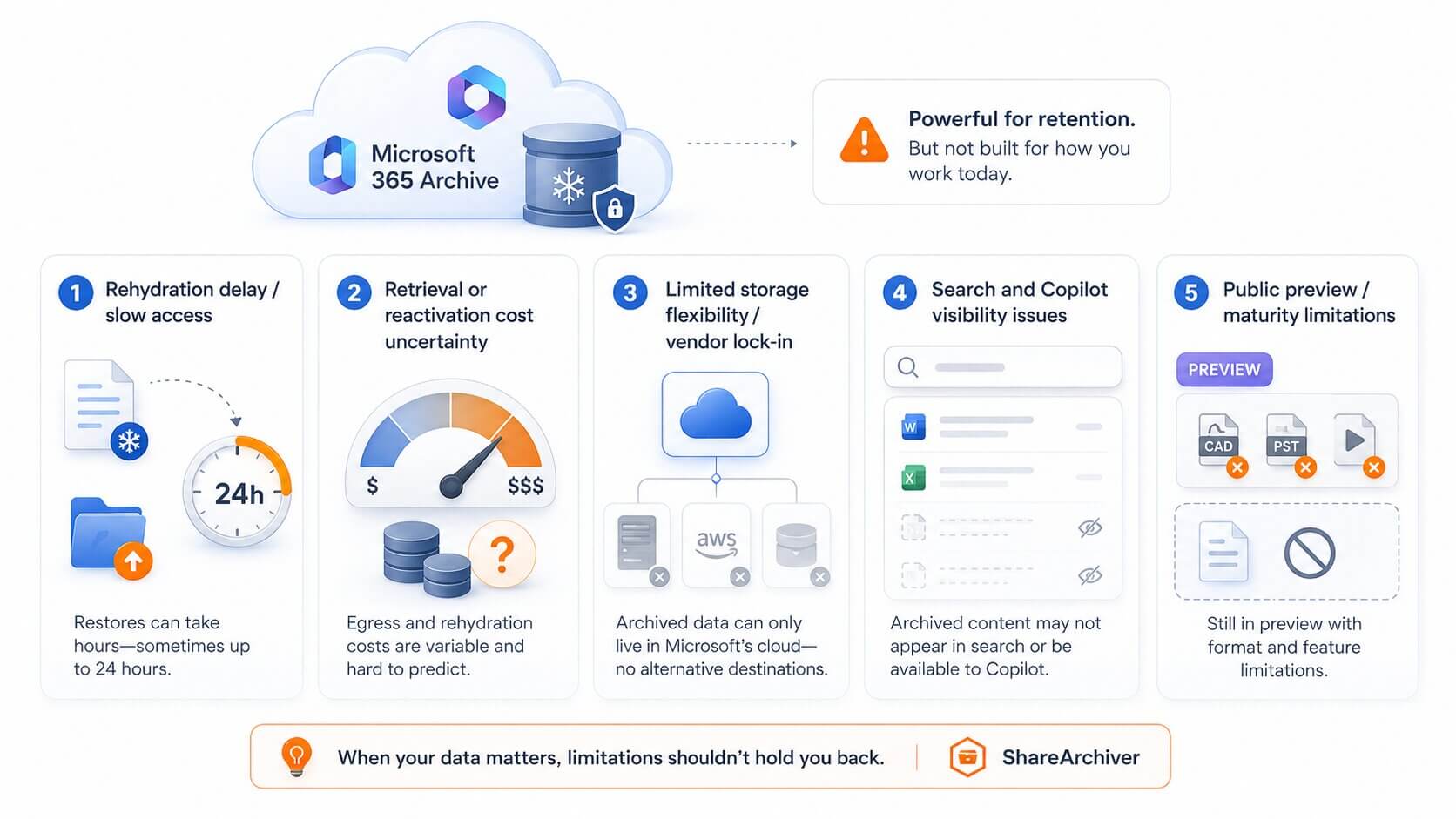
1. The Rehydration Problem
The most significant limitation of M365 Archive is rehydration delay. When a user needs to access a file that has been archived — whether it’s an individual file or an archived site — Microsoft’s native process can take up to 24 hours to make that content accessible again.
This is not a minor inconvenience. Consider the scenarios:
A colleague is presenting to a client and realises they need a document from 18 months ago. 24-hour wait. Presentation cancelled.
Legal requests a document for an eDiscovery matter. 24-hour wait. Now you’re explaining to counsel why you can’t produce it immediately.
A compliance audit requires accessing specific records. 24-hour wait. Auditors are not sympathetic.
This rehydration model works for truly cold data that nobody will ever need urgently. It doesn’t work for active business environments where « archived » doesn’t mean « gone forever. »
2. Per-GB Rehydration Costs
Microsoft charges a per-GB fee to rehydrate archived content — you pay to access your own data. For organisations that occasionally need to retrieve archived files (which is almost everyone), these costs accumulate quickly and are difficult to predict or budget for.
Third-party solutions like ShareArchiver use a subscription model with predictable pricing. No surprise fees when users need their files.
3. Limited Storage Flexibility
Microsoft 365 Archive stores data within Microsoft’s infrastructure — specifically Microsoft Azure. If your organisation has existing agreements with alternative cloud providers (AWS, Wasabi, Google Cloud), has data sovereignty requirements that specify particular regions or providers, or has on-premises infrastructure you want to leverage, M365 Archive doesn’t accommodate this.
ShareArchiver is storage-agnostic: archive to Wasabi, Amazon S3, Azure Blob, on-premises storage, or a hybrid combination. You’re never locked into a single vendor’s infrastructure.
4. Search and Copilot Visibility
When content is archived via M365 Archive, Microsoft’s documentation indicates that archived sites are removed from standard SharePoint search and Microsoft Copilot’s active index. For file-level archiving, the behaviour is still being clarified as the feature moves through preview — but the site-level precedent is not encouraging.
If your organisation uses Microsoft 365 Copilot, or if users rely on SharePoint search to find documents, archived content disappearing from search results creates a significant usability problem.
ShareArchiver preserves all SharePoint metadata in place via stub files, so archived content remains fully indexed and discoverable through both SharePoint search and Copilot.
5. File-Level Archiving Is Still Maturing
It’s worth noting that file-level archiving in M365 Archive is in public preview as of this writing, with general availability expected July 2026, and preview limitations may include unsupported file types where the Archive option does not appear for every file. Preview features can change, be delayed, or have functionality gaps that aren’t immediately obvious. Organisations planning a production archiving strategy should factor in that relying on a preview feature carries inherent risk.
SharePoint pages are excluded from file-level archiving, so the feature targets supported document-style content rather than page content.
6. User-Driven vs Policy-Driven Archiving
One of the main limitations of Microsoft’s native archiving approach is that it can be user-driven rather than policy-driven. This means users may need to manually decide which individual files should be archived. In practice, this is time-consuming, inconsistent, and can negatively affect productivity. Employees should be able to focus on their work, while archiving is handled automatically through clear business rules and retention policies.
User-driven archiving can also create access issues in shared environments. One user may archive a file that another team member still needs to access regularly. If retrieving that file involves additional costs, delays, or a waiting period of up to 24 hours, this can create unnecessary friction for the business. A more structured archiving solution helps ensure that files are moved based on policy, usage patterns, and business requirements rather than individual user decisions.
7. Limited Analytics and Visibility
Feature | Microsoft 365 Archive | ShareArchiver |
|---|---|---|
Data retrieval speed | Up to 24 hours (rehydration delay) | Instant — users access files as normal |
Retrieval cost | Per-GB rehydration fee | Included in subscription |
Storage flexibility | Azure only | Wasabi, Amazon S3, Azure, on-premises, hybrid |
File-level archiving | ✅ Public preview (GA: July 2026) | ✅ Generally available |
Site-level archiving | ✅ Available | ✅ Available |
Search visibility | ❌ Archived sites removed from search | ✅ Full metadata preserved — stays searchable |
Copilot compatibility | ❌ Archived content excluded from Copilot | ✅ Stub files maintain Copilot indexing |
User experience | Users encounter delays or access errors | Seamless — stub files are transparent |
eDiscovery support | Via Microsoft Purview | Built-in eDiscovery and legal hold tools |
Retention policy support | ✅ Via Microsoft Purview | ✅ Policy-driven with WORM support |
Admin analytics | Basic reporting | Advanced analytics: storage growth, access patterns, archive candidates |
Deployment | Cloud-native | Supports cloud, on-premises, and hybrid |
Pricing model | Pay-per-use + rehydration fees | Predictable subscription |
The Stubbing Difference: Why Access Speed Matters
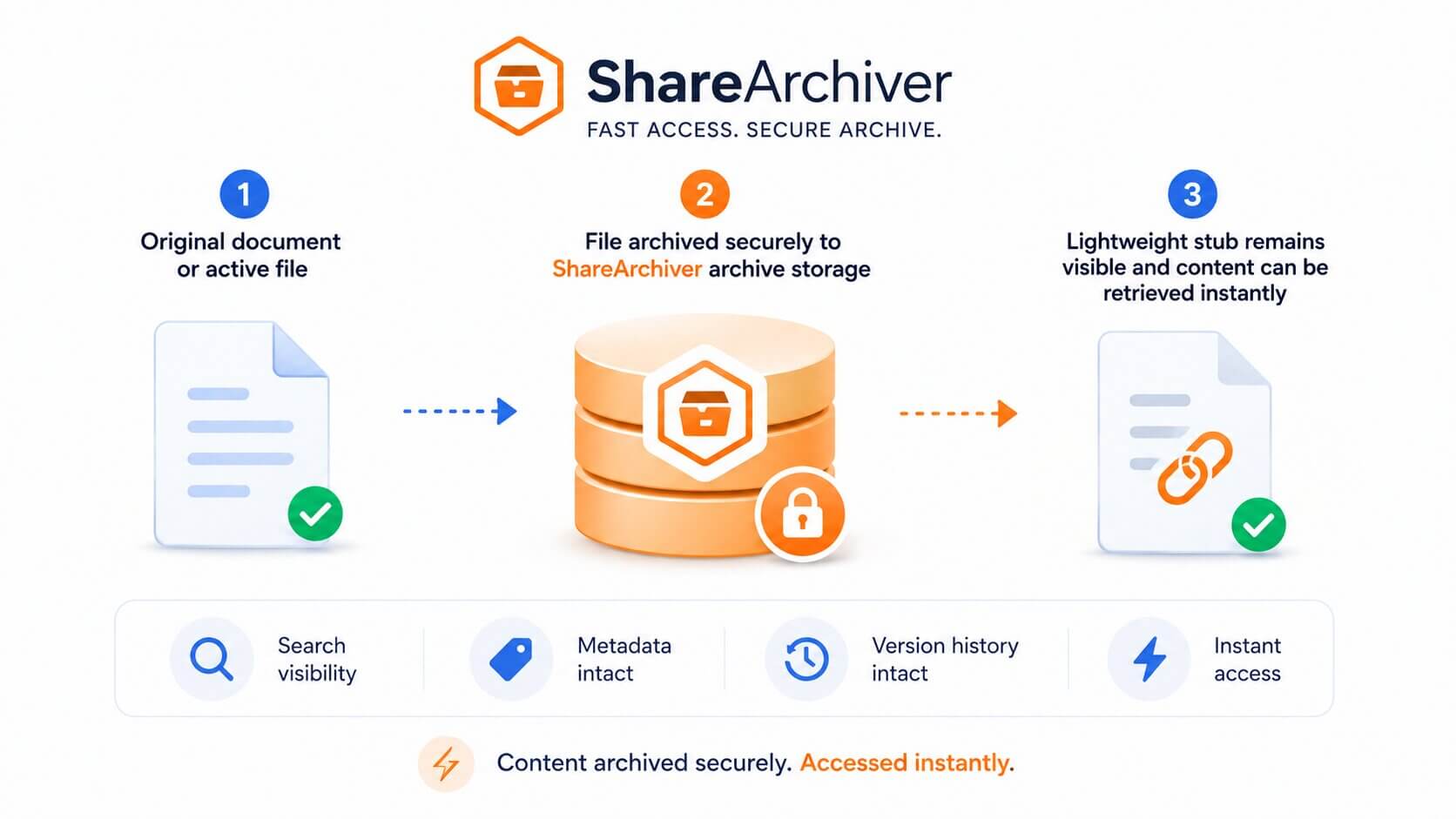
The core architectural difference between M365 Archive and a dedicated solution like ShareArchiver is the stubbing approach.
When ShareArchiver archives a file, it moves the file content to your chosen archive storage tier and leaves a lightweight « stub » file in the original SharePoint location. The stub looks exactly like the original file to end users. This also preserves access to version history from the user perspective instead of requiring a full return from an archived state before use. When they click it, ShareArchiver retrieves the content from archive storage and delivers it instantly — typically in seconds.
No delays. No error messages. No awareness on the user’s side that anything has changed.
Microsoft’s rehydration model, by contrast, requires the entire file to be moved back to active storage before it can be accessed — Microsoft first has to move content back from the archived state, which is what creates the 24-hour delay.
For most organisations, seamless access isn’t a luxury — it’s a requirement. Finance teams accessing year-old contracts, legal teams pulling documents for discovery, and IT admins managing compliance requests all need immediate access to archived data.
When Microsoft 365 Archive Makes Sense
Microsoft 365 Archive is the right choice when:
Your archiving needs are simple and primarily focused on cost reduction
You rarely need to access archived data (truly cold storage)
You want a native Microsoft solution with no third-party deployment
Your budget is very limited and the pay-per-use model works at your scale
When ShareArchiver Is the Better Choice
ShareArchiver is the better choice when:
User experience matters — you can’t have a 24-hour wait time when users need archived files
Storage flexibility is required — you have existing agreements with non-Azure providers or need on-premises archiving
Compliance demands are serious — you need full eDiscovery support, legal hold, WORM storage, and audit trails
Analytics matter — you want visibility into what’s consuming storage before you archive it, not just after
Cost predictability is important — you need a fixed subscription model, not per-GB retrieval fees
You’re a hybrid organisation — on-premises file servers, SharePoint Online, or both
FAQ: Microsoft 365 Archive vs ShareArchiver
In most cases, organisations choose one primary archiving approach. Using both simultaneously can create complexity around where data lives, which system governs retrieval, and how archived files are restored or reactivated.
Microsoft 365 Archive is designed for archiving SharePoint content inside Microsoft 365, while ShareArchiver is designed to provide more flexible archive storage, user access, compliance workflows, and long-term control. ShareArchiver is usually positioned as a third-party archiving solution that can replace the need for Microsoft 365 Archive rather than simply complement it.
ShareArchiver integrates with your existing SharePoint environment without requiring major reconfiguration. Initial setup involves connecting ShareArchiver to your SharePoint tenant, defining admin-defined policies, and deciding which SharePoint sites, libraries, file types, or inactive content should be archived.
This gives IT teams granular control over how archiving is applied, instead of relying only on broad site-level archiving or Microsoft 365 file level archiving rules.
Because ShareArchiver leaves stub files in place with full metadata, the Microsoft 365 Search index, which feeds Copilot, continues to see archived files in their original location. This helps archived files continue to appear in search results and allows users to access the content on demand.
This is important because end user search and admin search indexes are central to how organisations find SharePoint content. If archived content disappears from search results, users may need IT or compliance teams to locate data through admin-led tools instead.
This depends on how your Microsoft 365 Archive environment has been configured and what content has already been archived.
ShareArchiver can be configured around your current environment, but migration planning should be reviewed with the ShareArchiver team before making changes to existing archived sites or archived files. This is especially important if archived data is subject to retention policies, legal hold, sensitivity labels, or Microsoft Purview controls.
Microsoft’s documentation for file-level archiving is still evolving as the feature is in public preview. The 24-hour rehydration timeline is confirmed for site-level Microsoft 365 Archive; the specific timeline for file-level archiving should be verified against Microsoft’s latest documentation.
The important difference is architectural. Microsoft 365 Archive uses a reactivation model that may require content to be moved back from an archived state before it behaves like active files again. ShareArchiver’s stubbing approach is designed to eliminate this concern by keeping the user experience seamless.
No. Microsoft 365 Archive is a native Microsoft storage feature. It helps organisations move inactive SharePoint content into Microsoft’s archive tier to reduce storage costs and manage storage usage inside Microsoft 365.
A third-party archiving solution like ShareArchiver provides more control over external storage, data independence, user access, compliance tooling, legal hold, version history, custom workflows, and long-term archive strategy.
The Bottom Line
Microsoft 365 file-level archiving is a welcome addition to the Microsoft 365 toolkit, and it signals that Microsoft understands the growing storage problem organisations face. But for IT teams with real compliance demands, users who occasionally need archived files, and organisations that want storage flexibility and predictable costs — the native Microsoft solution has meaningful limitations.
ShareArchiver was built specifically for the scenarios where Microsoft 365 Archive falls short: instant access, flexible storage, serious compliance support, and a user experience that doesn’t require anyone to know archiving is happening.
See ShareArchiver’s SharePoint archiving solution →
Compare all features in detail →
Book a free demo →
Related reading: SharePoint Archiving vs. Backup: The Costly Confusion Most IT Teams Make